Categories
ALA Personal

Goodreader & the iPad

EDIT: please check out my new post, with the real problem identified. This post contains old information that is not correct!

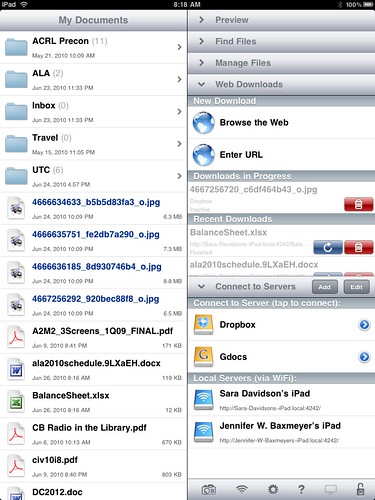
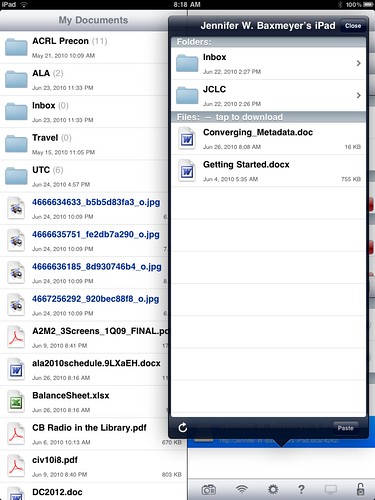
Goodreader is by far the best interface and app for handling different filetypes on the iPad…PDFs, doc files, images, etc. But this morning at the ALA Annual conference I discovered one really scary security issue with it. By default, Goodreader doesn’t require authentication or any warning to connect via Bonjour, and it allows you to browse AND DOWNLOAD any files that are so shared. Sitting in the Conference Center lobby, I was able to connect to two different iPads, view and grab files arbitrarilly, and push files TO the iPads as well.

Goodreader Security issue

Goodreader Security hole

This is INCREDIBLY SCARY. In the first 2 minutes, I saw files that had credit card information, passwords, bank account information, and more.

If you are using Goodreader and are connected to any public wifi point, make sure that you have gone into Settings, Other Settings, and make sure that Ask Permission Before Connecting is ON.

Categories
Library Issues Monkeys

Code Monkey a la LSW

Here’s what happens when someone offhandedly makes a comment about a music video on Friendfeed: dozens of librarians, thousands of miles apart, put together a small, almost-musical tribute to JoCo.

I discovered three things in watching this:

  1. My voice isn’t all that bad.
  2. There are people much more musically talented than I.
  3. Jason Puckett rocks.
Categories
Personal

Moving to WordPress 3.0

Since I’ve already taken the plunge and moved over to WordPress 3.0 and consolidated my various separate WordPress 2.X installs to it, I thought it would be good to document the process I used to try and help others who might be wary of taking the plunge. There are unlimited ways that you may have your particular install set up, so this may or may not apply. Do not fold, spindle, or mutilate.

It may be obvious, but before you do ANYTHING with your WP install, back up your files and your database. Backing up your files is as easy as downloading your install directory locally via FTP, and if you aren’t familiar with how to back up your database (YOU SHOULD BE BACKING UP YOUR DATABASE REGULARLY) there are good instructions here. Go back up your site, and come back when you’re done.

Everything safe? Ok, now…you want to go to your WordPress dashboard, hit Tools, and Export. What you’ll get is an XML file of all the content from your blog: posts, categories, tags, authors, etc. Save this in a very, very safe place. This is the file that you will use to import your blog into your new WP 3.0 site. Repeat this step for every blog you hope to move, renaming the Export file into something recognizable.

In my particular instance, I had a site set up that went like this: at the root level of my website, I had just a flat HTML file that was my homepage. I had two different WordPress 2.X installs in subdirectories (/wp and /eliza). What I wanted to do was to install WP3.0 in my root directory, and then use the Multisite functionality built in to WP3.0 to re-create the /wp and /eliza blogs, running in the single root-level install.

After backing everything up, I went ahead and installed WP3.0 in the root directory. There is then one bit of manual code you have to add in order to enable multisite capabilities. In your wp-config.php file, just before the line

/* That's all, stop editing! Happy blogging. */

You need to add the line

define('WP_ALLOW_MULTISITE', true);

This enables multisite capabilities. You’ll have to do a little bit of copy/paste into your .htaccess file, but WP walks you through it. When you log into your install again, you’ll see a new set of controls in your dashboard relating to these new capabilities.

One more bit of editing is needed before you move on to creating new blogs and importing your XML files into them…by default, WordPress filters imported XML by removing possible troublesome tags…unfortunateely, including things like <embed> and <iframe> and other instances where you’ve included content in your posts. WordPress does so via a file you can find in /wp-includes called kses.php. In kses.php, you’ll want to scroll down to line 1309 and comment out the three lines under //Post filtering so that they look like this:

// Post filtering
#add_filter('content_save_pre', 'wp_filter_post_kses');
#add_filter('excerpt_save_pre', 'wp_filter_post_kses');
#add_filter('content_filtered_save_pre', 'wp_filter_post_kses');

This will prevent the filter from removing all your youtube videos, slideshare embed, scribd documents, etc. Once you’ve altered the filter and saved it, you’re ready to create your new blogs, hit the Tools menu, and import your XML from your exports above. After the process completes, you should have a working blog with all of your previous content in place exactly as before.

For my particular case, it was important for me to maintain the existing directory paths for /wp and /eliza so as to not break tons of incoming links…WP3.0 handles that perfectly. After all this, I now have WordPress running at the root level of jasongriffey.net, Pattern Recognition and Brand New World working exactly as they were with the separate installs (including permalinks!), and will be moving my previously flat-file homepage into WordPress pages. I’ve got my whole site running on WordPress, and the ability to create new blogs at will in order to expand my setup.

I’m chuffed about the setup, and really, really excited about the possibilities with WordPress 3.0.
Categories
ALA Legal Issues mobile

There’s an app for that – OITP Brief on Mobile

The American Library Association Office of Information Technology Policy, better known as ALA-OITP, just released their Policy Brief on Mobile Tech, There’s an App for That! Libraries and Mobile Technology: An Introduction to Public Policy Considerations. Written by Timothy Vollmer, formerly of OITP and now working for Creative Commons, it’s a great “state of the union” brief on Mobile tech, and how it effects the library world in the current and near-future time frame.

I was honored to have been an early reader on this piece, and to have been able to give feedback to Timothy as he worked it up. If you have any interest at all about the future of libraries and the mobile world, this is a must read.

Categories
mobile presentation

OLITA Digital Odyssey 2010

I had a fabulous time in Toronto with the Ontario Library Information Technology Association over the weekend at their 2010 Digital Odyssey event. In addition to getting to see old friends, I had the opportunity to meet some new ones, and generally meet some amazing librarians. I was really impressed with the quality of presentations that were done at Digital Odyssey.

Here is the keynote I gave on Friday morning…I hope that everyone enjoyed it! I’m working on getting audio of this put together, but it seems that Keynote isn’t happy with me again for some reason. I think I can fix this one, though, so look for audio/video over the next few days.

Categories
ALA presentation

What have I gotten myself into?

Battledecks. ALA Annual 2010. Be there, if for no other reason than to laugh in nervous neighbor shame. Can’t wait to see how this gets counted in my annual review at MPOW.

Categories
presentation

Heading to Toronto

This Friday I will be doing a keynote for the Ontario Library Information Technology Association‘s Digital Odyssey 2010, and I couldn’t be more excited. I have never had the opportunity to visit our neighbors to the North…I’m a southern boy, and the farthest north I’ve ever been is *looks at map*, at least by sheer latitude, Seattle, WA.

I will be talking about, unsurprisingly, Mobile, specifically the future of mobile and what we can expect to see in the next 3-5-10 years.

If anyone has absolute DO NOT MISS stuff for Toronto, please let me know. I won’t have a ton of time to look around, but I’d love to not waste the opportunity. For those of you that will be there, please excuse my horrific yet quaint Southern accent. 🙂

Categories
ALA

ALA Annual 2010 Unconference

If you didn’t get the chance last year, the ALA Annual Unconference was awesome, and it’s back this year for a return engagement. Whether you are a fan of the Unconference form, or just interested in what the buzz is about, the 2010 ALA Annual Unconference should be a really, really good way to spend the Friday of the Annual Conference.

One of the things that people say brings them to Annual is the opportunity to network, and attendees consistently say that they want more networking opportunities. This is the perfect networking opportunity, and I give you a money-back guarantee for the cost of the Unconference that you’ll meet interesting and thought-provoking people.

Go! Register! Attend! You’ll love it.

Categories
presentation

IOLUG 2010 Mobile Futures

Here are the slides for my presentation given today for the Indiana Online Library Users Group 2010 meeting. I actually did an audio capture of my talk, using the Keynote record function…and Keynote crashed halfway through the video render, corrupting the file and forcing me to roll back to a previous version of the file (go go Dropbox). *sigh* So disappointed to lose the audio, because I thought that it went really, really well. In any case, here are the slides. I suppose one day I’ll learn to stop trusting technology.

Categories
Digital Culture Media

Interfaces, part 2

This distinction from the post below, that media can either be collapsed (Content, Container, and Interface as a single piece, as a book) or expanded (each separated, as in a DVD, remote, and screen) explains a bit about why the Touch interface is so visceral. The iPad feels different from other devices when you use it, and one of the reasons that I believe it does is that it collapses what have been expanded media types. With the iPad (and to a lesser degree, the iPhone, Android devices, Microsoft Surface, etc) you directly interact with the media and information you are working with. When you watch a video on the iPad, the Content, Container, and Interface are as-a-piece, and you interact with the video by touching the video itself.

This has a lot to do with the revolutionary feel of these new touch devices…and I think it explains why previous attempts at things like Tablet PCs may have failed.